


Picsart AI Photo Editor, Video
PicsArt, Inc.
When I need to turn an ordinary phone photo into something ready to share, I usually want two things: a quick way to clean up the image and enough control to make the result feel intentional. Picsart AI Photo Editor, Video sits in that space between a simple one-tap editor and a more involved creative studio. I tested it as a photography app from PicsArt, Inc., moving through the kind of workflow most people actually use: choosing a slightly messy photo, removing distractions, changing the background, adjusting the look, and deciding whether the finished image was worth saving or sharing.
The app is free to install, with optional purchases ranging from $0.99 to $219.99 per item. That distinction matters because the basic experience is approachable, while some of the more ambitious creative tools can lead you toward paid choices. Its Teen content rating also makes it feel aimed at a broad audience rather than only professional photographers. The current version is 29.9.9, and it runs on Android devices using version 6.0 or later.
From an everyday photo to a finished image
Starting with the right kind of photo
My most useful test began with a realistic image rather than a carefully staged portrait: a person standing outdoors with a busy background, uneven light, and a few objects that distracted from the subject. This is where the app makes sense. You do not need a perfect original file to begin, and you do not have to understand layers, masks, or professional color terminology before making progress.
Related News
How Google Photos Redefined the Photography App Market
How Picsart AI is Transforming Mobile Photo Editing
Toonapp: Transform Your Photos into Cartoon Art
The first practical decision is choosing whether the photo needs correction or transformation. If the problem is a stray object, an unwanted passerby, or clutter near the edge, the removal tools are the natural starting point. If the setting is the problem, background replacement becomes more useful. Trying to do both immediately can make the image look artificial, so I prefer to solve the biggest visual issue first and inspect the edges before adding decoration.
This order is one of the app’s quiet strengths. It encourages a fast visual workflow instead of forcing me to build an edit from a blank canvas. I can begin with a camera-roll image, make a targeted change, and then decide whether the result needs a broader style treatment. For social posts, profile images, marketplace pictures, and simple announcements, that is more practical than opening a full desktop editor.
Latest News

Uber Eats Under Pressure: What Happens When Delivery Goes Wrong

How QR & Barcode Scanner Adapts to Android and iOS Innovations

Why Waze Navigation & Live Traffic Is Your Essential Travel Companion

CapCut Mastery: Unleash Hidden Features for Pro-Level Editing

How OS Updates Enhance Roblox Adventures

Teacher Simulator: Exam Time Turns Quick Classroom Judgments into a Repetitive Loop
Removing distractions without losing the subject
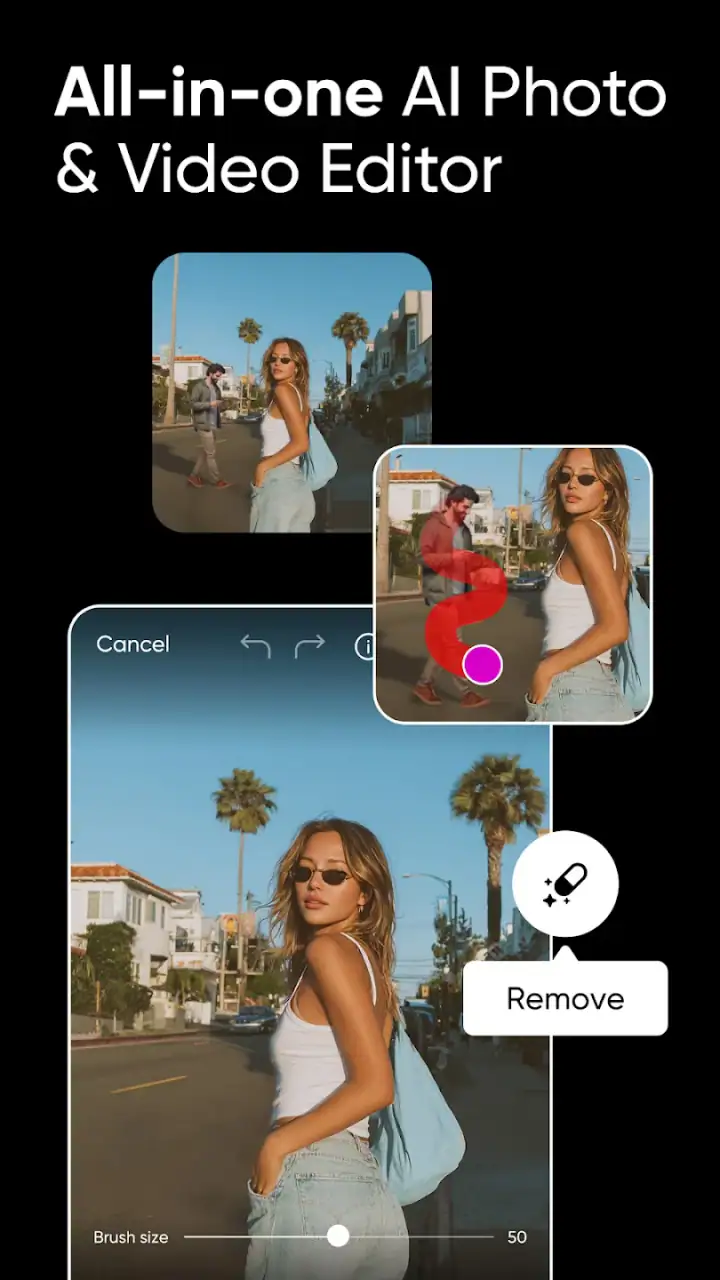
I found that object removal works best when the unwanted element is clearly separate from the main subject. A small mark or isolated background item is an easy request. A complicated object crossing hair, clothing, or a detailed architectural line is a much harder one. In those cases, I treat the first result as a draft rather than an automatic final.
My tip is to zoom in after every significant removal. At normal viewing size, a repeated texture or soft patch may look acceptable. Once enlarged, the repair can reveal itself through broken lines or an oddly smooth area. If the object sits near a person, I would rather remove it in smaller passes than make one broad selection. This takes a little longer, but it gives the surrounding detail a better chance of surviving.
That workflow also shows where an AI-assisted editor differs from a traditional clone tool. A conventional editor gives me precise manual control, but it asks for more patience and a steadier hand. Picsart is faster for a casual correction, especially when the background is visually simple. It is less dependable when the edit must preserve exact patterns, text, or fine edges.
Gallery
Swapping the background with a purpose
Background replacement is more than a novelty when the original setting is genuinely unhelpful. I used it as a way to turn a casual portrait into a cleaner image with a more deliberate mood. The important step is not selecting the most dramatic background; it is choosing one whose lighting, perspective, and color make sense beside the subject.
A bright subject placed against a dark background can look cut out even when the separation is technically accurate. I get better results by matching the general brightness first and then using the editor’s other adjustments to bring the subject and replacement setting closer together. Slightly imperfect harmony often looks more believable than an extreme scene that announces the edit immediately.
Hair, transparent objects, and loose clothing are the areas I inspect most carefully. Automated separation can be convincing around a solid outline but less natural around fine strands or semi-transparent edges. For a quick social image, that may be an acceptable trade-off. For a product listing or professional portrait, I would spend more time checking the boundary before publishing.
Building the look after the repair
Once the main correction is complete, I move to the creative part. Picsart is not limited to fixing flaws; it is designed for combining edits, visual treatments, and a more expressive finish. I prefer to make the image readable before making it stylish. If the subject is already clear, a restrained adjustment can add personality. If the composition is weak, effects will not solve the underlying problem.
A useful habit is to save or preserve a clean version before experimenting with heavier changes. That gives me a safe starting point if a later effect becomes too strong. It also makes comparison easier: I can judge whether the new treatment improves the photo or merely makes it busier.
The app’s broad creative approach is helpful for people who want to make collages, social graphics, or imaginative edits without switching between several specialized tools. At the same time, the large range of possibilities can make the interface feel less focused than a minimalist photo editor. I sometimes arrive wanting one repair and find myself browsing options that are interesting but unrelated to the original task.
Handling the handoff from edit to sharing
The most important handoff is the moment when a private working image becomes a finished file. Before exporting, I check the whole frame at normal size, then inspect the subject’s outline and any removed areas more closely. This catches the mistakes that are easy to miss while concentrating on one small part of the picture.
I also consider where the image is going next. A square composition may work well for a social post but crop an important part of a portrait elsewhere. A background swap that looks convincing on a phone screen may feel less natural when viewed larger. Picsart makes experimentation easy, but it cannot decide whether the final crop suits the destination, so that judgment remains mine.
For a group project or a small business workflow, the handoff can be less straightforward than the editing itself. One person may choose the original, another may approve the background, and a third may need a consistent style across several images. The app is convenient for individual creation, but consistency requires a clear process: agree on the visual direction first, then repeat the same editing decisions rather than treating every image as a separate experiment.
What the finished result does well
After a careful pass, the strongest result is usually an image that looks cleaner without looking heavily processed. Removing one distraction can improve a photo more than adding several decorative effects. Background replacement is most successful when it supports the subject’s purpose, such as making a portrait easier to use in a simple announcement or giving a product image a less cluttered setting.
I would describe the app’s best outcome as fast visual problem-solving with room for creativity. It is especially useful when the original photo is nearly right but has one obvious obstacle. The combination of object removal and background work means I can handle common fixes in one place instead of moving between a retouching app, a cutout tool, and a design editor.
Its scale reflects that wide appeal: Picsart has an average rating of 4.0 from around 12 million ratings and has passed one billion installs. Those figures do not guarantee that every edit will suit every person, but they do match my impression that this is a mainstream tool built for frequent, varied use rather than a narrow professional niche.
Where the flow breaks down
The first point of friction is precision. AI-assisted editing can save time, but it does not remove the need for review. Fine hair, repeated patterns, reflective surfaces, and objects touching the subject can produce results that need correction or a different approach. If your standard is pixel-level accuracy, a desktop editor with detailed manual controls remains the better choice.
The second issue is creative overload. Someone who only wants to brighten a photo, straighten it, and crop it may find Picsart broader than necessary. A simpler editor can feel calmer and faster for routine adjustments. I would choose Picsart when removal, background changes, or more expressive composition are part of the job, not merely because I need a basic exposure correction.
The third consideration is the free-to-paid boundary. The app costs nothing to download, but optional purchases are present, and the listed range reaches $219.99 per item. I recommend treating premium prompts as a decision point rather than tapping through automatically. If you are editing casually, the free path may be enough for your needs; if you plan to rely on advanced creative tools regularly, check each purchase carefully and decide whether that workflow justifies the cost.
There is also a quality trade-off between speed and repeatability. A one-off image can tolerate a little visual imperfection, while a set of ten product photos cannot. When consistency matters, I would compare the same type of edit across the entire set before committing. Otherwise, each automated result may look acceptable alone but noticeably different beside the others.
Who will get the most from it
I would recommend this photography app to people who want to improve phone photos without learning a full professional program. It is a strong fit for creators preparing social images, families cleaning up personal pictures, students making visual projects, and small sellers who need to remove clutter from product shots. It is also useful for anyone who enjoys experimenting with backgrounds but still wants a recognizable starting photo.
A realistic everyday example would be photographing a used chair for an online listing. I could remove a distracting bag from the room, replace or simplify the background, adjust the framing, and produce a clearer image without opening several separate apps. The important caution is to keep the chair itself accurate. Creative editing is helpful for presentation, but changing its color or shape would mislead a buyer.
I would skip it if my main goal were highly controlled professional retouching, advanced raw-photo development, or a quiet interface with only essential tools. In those situations, a specialized editor is likely to provide better control and less distraction. Picsart is most convincing when the job combines cleanup with visual creativity, rather than when it is asked to behave like a dedicated technical darkroom.
My recommendation after following the complete workflow
My overall view is positive, with a clear condition: use it as a flexible creative assistant, not as an automatic guarantee of perfection. Start with the biggest problem in the photo, make small corrections, inspect the edges, and only then add style. That sequence keeps the result believable and prevents the available effects from taking over the original purpose.
The best reason to choose Picsart is the handoff from correction to creation in one workspace. I can begin with an imperfect phone image, remove an obstacle, change the setting, and shape the final mood without abandoning the project halfway through. That convenience is more valuable than any single effect.
After years of seeing photo editors promise instant transformations, I appreciate that this one still rewards human judgment. Its AI features can shorten the tedious parts, but the final quality depends on selecting sensible source material, checking difficult edges, and knowing when to stop. If that sounds like the kind of control you want, the free entry point makes it easy to try. If you only need basic adjustments or demand exact professional precision, a narrower alternative may serve you better.
For me, Picsart AI Photo Editor, Video earns its place on a phone because it handles a complete, practical path from messy input to shareable result. It is broad, occasionally busy, and not immune to imperfect automated edits, but it gives everyday photographers enough power to solve common problems and enough creative space to go further when the image calls for it.
FAQs for Picsart AI Photo Editor, Video
What features does Picsart AI Photo Editor offer?
Picsart AI Photo Editor provides a comprehensive suite of tools for both photo and video editing. Key features include AI-powered effects, background removal, filters, stickers, and text overlays. Additionally, it offers advanced video editing capabilities such as trimming, transitions, and music integration, making it versatile for both casual and professional users.
Is Picsart AI Photo Editor free to use?
Yes, Picsart offers a free version with basic features. However, for access to premium tools, effects, and an ad-free experience, users can subscribe to Picsart Gold. This subscription provides a broader range of editing options and exclusive content to enhance creativity and productivity.
How user-friendly is the Picsart interface for beginners?
Picsart AI Photo Editor is designed with an intuitive interface that caters to both beginners and experienced users. The app offers easy-to-navigate menus, guided tutorials, and customizable templates. Its user-friendly design helps newcomers quickly learn how to apply effects and make edits without feeling overwhelmed.
Does Picsart support social media sharing?
Absolutely, Picsart simplifies social media sharing with direct export options to platforms like Instagram, Facebook, and TikTok. Users can seamlessly share their edited photos and videos, ensuring their creations reach their audience with ease and maintaining high-quality output during the sharing process.
Are there any privacy concerns with using Picsart?
Picsart prioritizes user privacy by adhering to strict data protection protocols. Users should review the privacy policy to understand how their data is used. It’s important to be aware that any photos or videos edited within the app might be stored temporarily for processing purposes, but users retain control over their content.
Pros
- Wide range of editing tools available.
- User-friendly interface
- easy to navigate.
- Regular updates with new features.
- Robust AI-driven enhancement options.
- Large community for inspiration and support.
Cons
- Some features require in-app purchases.
- Occasional ads can be intrusive.
- Can be resource-heavy on older devices.
- Limited offline functionality.
- AI results can be inconsistent.


